Workout Planner Calendar: 2026 Guide to Smarter Training
Your coach sends a clean workout in an email. Or maybe it’s in TrainingPeaks notes, a WhatsApp message, or a spreadsheet tab called “final-final-v3.” The session itself is good. The problem starts when you try to use it.
You still have to turn that note into something your watch or bike computer can run. That usually means copying intervals by hand, rebuilding repeats in a clunky editor, checking targets twice, and hoping you didn’t miss a recovery block. It’s boring work, and it creates the exact kind of friction that makes people skip the planning step.
A good workout planner calendar fixes more than scheduling. It connects training theory, daily logistics, and device execution. Done well, it turns a plan from a document you meant to follow into a session that shows up on the right day, on the right device, with the right prompts when you need them.
Table of Contents
- Why Your Training Plan Needs a Modern Workout Calendar
- The Unskippable Principles of Effective Workout Planning
- From Plain Text to Perfectly Structured Workouts
- How to Build Your Weekly and Monthly Training Calendar
- Syncing Your Plan Straight to Your Device
- Advanced Strategies and Frequently Asked Questions
Why Your Training Plan Needs a Modern Workout Calendar
The most common planning problem isn’t bad motivation. It’s translation.
An athlete gets a solid session from a coach. “Warm up, then 5 x 5 minutes at threshold with 3-minute recoveries.” That should be simple. In practice, it often lives in an email, note, or chat thread. Then the athlete has to rebuild it manually in Garmin Connect, another workout builder, or a head unit platform before it becomes usable.
That gap matters more now than it did a few years ago. The ACSM 2026 fitness trends forecast identifies wearable technology as the top fitness trend for the 20th consecutive year, and notes that over 70% of users apply wearable data to inform exercise. That changes the role of a workout planner calendar. It’s no longer only a visual organizer. It’s the control center that connects planning to execution.
Static plans break at the point of use
PDF plans still have value. So do spreadsheets. I’ve built plenty of training blocks in both. They’re flexible, easy to revise, and good for seeing the whole month.
But they fail at the moment an athlete needs action.
A static plan can tell you what Tuesday should be. It can’t guide your intervals in real time on a Garmin watch or a Wahoo head unit. It can’t prompt recovery durations, hold repeat structure, or reduce setup mistakes. The athlete still has to do conversion work before training starts.
Practical rule: If a workout needs to be rebuilt by hand before you can do it, the plan still isn’t finished.
That’s why modern planners have to do more than hold appointments on a calendar grid. They need to support structured sessions and move them cleanly into the tools athletes already train with.
A modern calendar closes the intention gap
The best workout planner calendar does three jobs at once:
- It organizes the week so hard days, easy days, and rest days land in sensible places.
- It preserves structure so intervals, durations, and targets stay consistent.
- It reaches the device so the athlete follows the planned session instead of improvising.
Newer text-first workflows cut out the formatting step. Athletes and coaches want less admin and more training, which is what tools like TextFit’s structured workout workflow are built around.
A modern calendar doesn’t replace coaching judgment. It removes the clerical work that used to sit between a good plan and a completed workout.
The Unskippable Principles of Effective Workout Planning
A clean calendar can still hide weak training decisions.
I’ve seen plenty of plans that look organized in a monthly view and fall apart by week two. The pattern is familiar. Hard sessions get packed into the same stretch, recovery is treated like optional filler, and the athlete ends up reacting to fatigue instead of building form on purpose.
Good planning starts before anything goes on the calendar. The job is to decide what stress belongs this week, what can wait, and what needs to be repeated long enough to matter.
A Calendar Has to Show Training Logic
Useful plans are built around a few clear questions. What is the athlete trying to improve first? How will progress be tracked? Where does recovery sit? What gets reduced when life gets noisy?
Those answers matter more than a pretty layout. A workout plan builder for structured training blocks is most useful when it helps you turn those decisions into something you can review and adjust, not when it only gives you more places to drag workouts around.
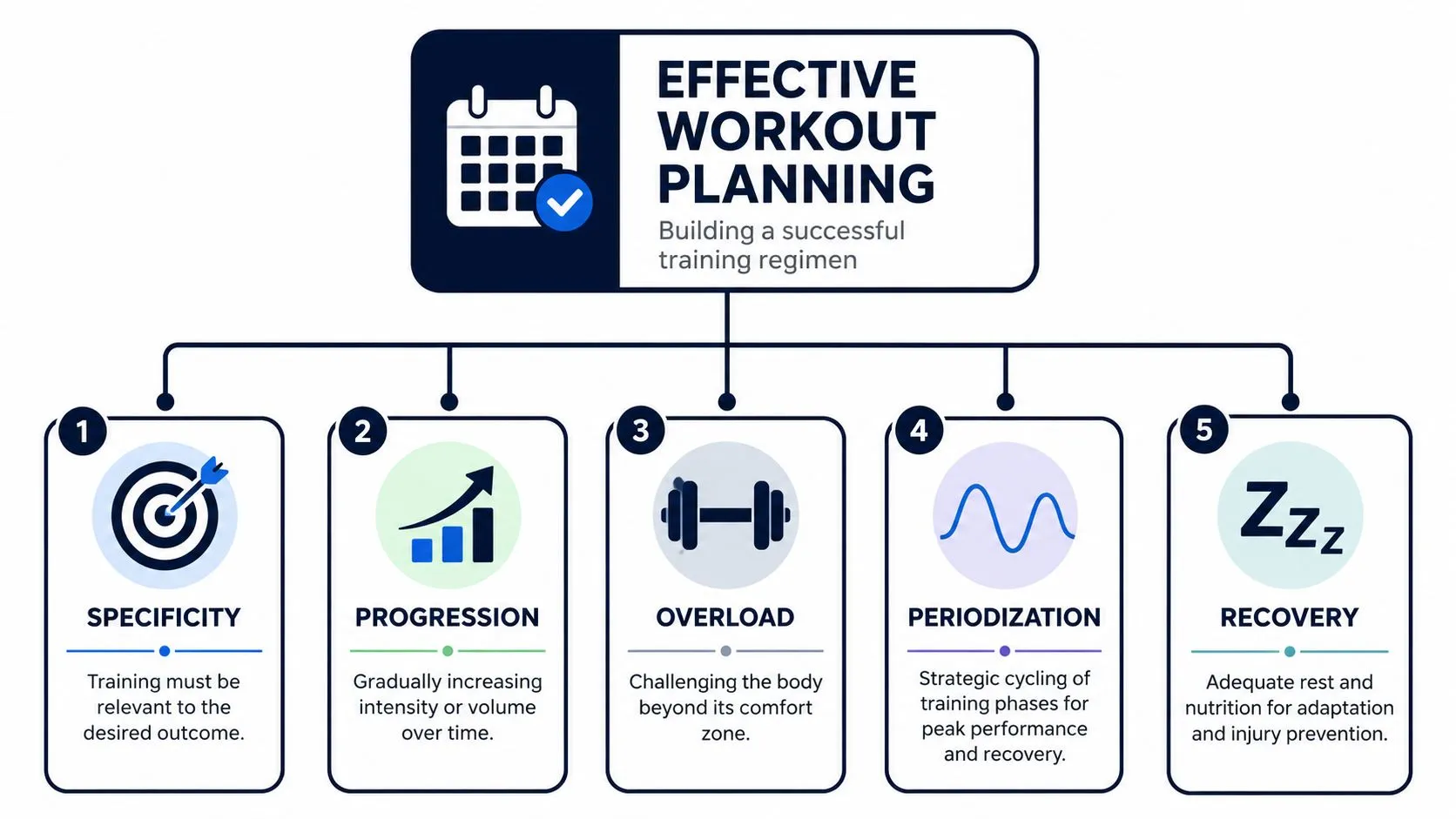
Every effective plan I’ve built, whether for a beginner or an experienced endurance athlete, comes back to the same principles:
| Planning question | What a good answer looks like |
|---|---|
| What are you training for? | A specific result, not a vague wish to “get fitter” |
| How will you measure progress? | Logged sessions, repeatable benchmarks, or training notes you can review |
| What stress are you applying? | Endurance, threshold, strength, speed, skill, or a clear mix with a reason |
| When do you recover? | Rest days and lower-load sessions placed on purpose |
| How will the plan change? | A rule for adjusting volume or intensity when fatigue, travel, or missed sessions show up |
That last row gets ignored all the time. Real plans need room for real life. The difference between a smart calendar and a fragile one is whether you already know what gets cut first.
What Periodization Looks Like in Practice
Periodization is organized sequencing across time. Coaches have used it for decades because it solves a basic problem. You cannot push everything at once and expect steady progress.
The old way was to sketch that sequence in notebooks, spreadsheets, or static calendars. The modern version should keep the same logic while removing the clerical work. You still decide the training emphasis by block. You still build weeks around stress and recovery. The improvement is that those decisions can move from plain language into structured sessions without hours of manual setup.
A practical workout planner calendar should make three levels visible:
- Macro view: the larger training cycle, goal date, and key milestones
- Meso view: the current block and its focus, such as base, threshold, race prep, or strength
- Micro view: the week itself, where session order, load, and recovery either make sense or don’t
Good periodization is rarely flashy. It usually looks restrained. One or two demanding sessions in a week. A longer aerobic session if the sport calls for it. Supporting work that fits the goal block. Enough recovery to absorb the work rather than survive it.
That is where modern planning tools should help. They should preserve periodization, not flatten it into a pile of disconnected workouts.
The Mistakes That Break a Plan
Most self-built calendars fail for predictable reasons.
- Too much intensity: Every session gets treated like a test.
- Recovery has no place: Rest is left to chance or guilt.
- No progression: The same week repeats until progress stalls.
- Poor records: Sessions happen, but nothing useful gets logged.
- Goals are too loose: “Build fitness” does not tell you what to schedule on Tuesday.
Public-health guidance still matters here. The CDC’s physical activity guidelines for adults set a useful baseline of regular aerobic activity plus muscle-strengthening work during the week. That baseline is a floor. It is not a periodized performance plan, and it will not tell an athlete how to place threshold work, long runs, or deload weeks.
The true test is reviewability.
If last week’s entries do not make this week’s decisions easier, the calendar is missing part of its job. A strong planning system should let you scan the block, understand the intent, and convert that intent into structured training without rebuilding everything by hand each time.
That is the bridge between classic planning and the newer AI workflow. Periodization still sets the direction. Automation handles the formatting, structure, and repeatable setup work that used to eat up coaching time.
From Plain Text to Perfectly Structured Workouts
Coaches and athletes still describe workouts the same way they always have. They write them in plain language.
That part isn’t broken. The friction starts when someone has to convert normal human instructions into rigid workout steps that a device can understand.
The Old Way Creates Friction at Every Step
Take a common session:
Warm up. Then 5 x 5 minutes at threshold with 3-minute recoveries. Cool down.
In a traditional builder, that usually means selecting a workout type, adding a warm-up block, inserting an interval block, defining work duration, defining recovery duration, setting repeat count, checking whether the target should be pace, power, or heart rate, then adding a cooldown. If the app handles repeats awkwardly, you may be rebuilding each interval one at a time.
That’s manageable for one workout. It gets old fast when you’re planning a full month.
The old workflow has a few predictable weaknesses:
- Interpretation errors: A coach’s note may be clear to a person but unclear to a generic editor.
- Too many clicks: Simple repeat sessions take longer than they should.
- Harder revisions: One change in interval length can force a rebuild.
- Calendar drag: Planning gets delayed because creating the workout feels like admin work.
The Better Workflow Starts with Plain Language
That’s why text-first creation makes so much sense. The athlete or coach writes the session naturally, then the system structures it into discrete workout steps with recoveries, repeats, and targets.
This matches how people already think.
The scheduling demand is there too. A 2026 fitness trends summary reports that 72% of consumers choose online fitness solutions for schedule flexibility. That’s a strong signal that people don’t want more setup friction. They want planning tools that fit around real life, not systems that add another layer of administration.
A plain-text workflow solves a practical problem that older builders never addressed well: speed without ambiguity. You can draft a workout the way you’d send it in a message, review the structure, make a quick edit, and place it into your calendar.
For athletes who want more detail on the mechanics, this guide to a structured workout plan builder workflow is a useful reference point.
What Good Structure Looks Like
The best conversion workflow does more than save time. It improves clarity.
Here’s what a useful structured output should preserve from the original note:
| Plain-language element | Structured result |
|---|---|
| Warm up | A dedicated warm-up step |
| 5 x 5 minutes | A repeat block with five work intervals |
| Threshold | A target field tied to pace, power, or effort |
| 3-minute recoveries | Explicit recovery steps between efforts |
| Cool down | A final cooldown step |
That matters because athletes don’t fail workouts only from lack of effort. They also fail from fuzzy execution.
If the workout on your device leaves room for guessing, it wasn’t structured tightly enough.
A workout planner calendar becomes much more useful once every session can move from note to structured session without manual rebuilding. That’s the point where planning starts to feel light instead of tedious.
How to Build Your Weekly and Monthly Training Calendar
A training calendar usually breaks on Thursday, not on paper.
Monday looks clean. Tuesday is ambitious. By midweek, work runs late, sleep slips, one hard session bleeds into the next, and the plan starts asking for more than the athlete can absorb. A useful calendar accounts for that before the block begins.
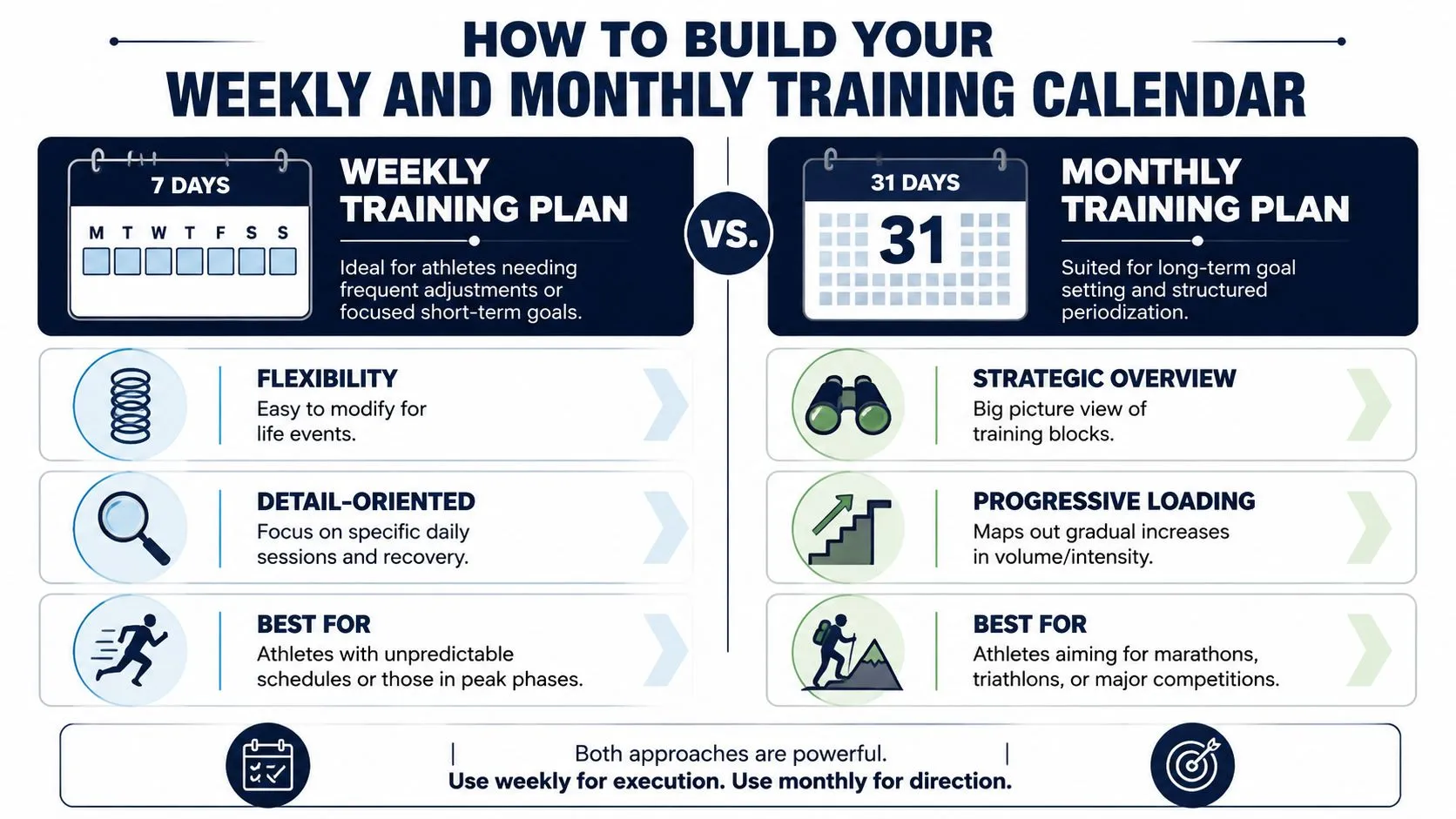
Weekly planning sets the rhythm. Monthly planning controls the cost of that rhythm over time. Put those two views together and periodization stops feeling like coaching jargon. It becomes a practical way to decide what goes where, when to press, and when to back off.
Start with a Repeatable Week
A coaching article from GB Sweat Equity Fitness on crafting a workout schedule points to a pattern that holds up because people can repeat it: a set number of training days, planned recovery days, and regular adjustment. The same logic works for endurance training, strength work, and mixed-sport schedules.
Start by placing the sessions that matter most. Everything else supports them.
A solid weekly workout planner calendar usually includes:
- One or two key intensity sessions
- One longer endurance session
- Easy work between hard days
- At least one full recovery day
- Enough open space for work, family, and missed-session reshuffling
That last point matters more than athletes want to admit. Calendars fail when every day is already spoken for. Leave one low-cost day each week where an easy session can move if life gets in the way.
Hard sessions also need good placement. Tuesday and Thursday often work well because they leave room after the weekend long session and before the next one. Back-to-back intensity can work for experienced athletes building toward a specific demand, but it raises the recovery bill fast.
Use the Monthly View for Periodization
The weekly calendar answers, “What am I doing today?” The monthly calendar answers, “What is this block trying to build?”
That is the point of periodization in practice. Give each few-week stretch a job. Build aerobic durability. Raise threshold. Support race-specific work. Then reduce load before stale legs turn quality sessions into survival sessions.
I still prefer a four-week view for most athletes because it makes patterns obvious. You can see whether the plan is progressing, repeating, or digging a hole.
A simple monthly build looks like this:
- Set one training focus for the block.
- Repeat the key sessions often enough to compare execution.
- Increase duration, density, or difficulty in small steps.
- Schedule a lighter week before fatigue starts flattening quality.
- Begin the next block with adjustments, not a full rebuild.
That structure used to be tedious to manage. Coaches would sketch the month in one place, write workouts in another, then rebuild each session for the device. Now the workflow is much cleaner. You can outline the block in plain language, convert each workout into a structured session, and drop it onto the correct day without hours of formatting. That makes periodized planning realistic for self-coached athletes too, not just for coaches with time to spare.
The embedded walkthrough below is helpful if you want another visual model for laying out training across a calendar.
Three Practical Calendar Templates
Use these as starting frameworks, then adjust for training age, recovery rate, and schedule constraints.
Runner focused on a 10K
- Monday: Rest or short mobility
- Tuesday: Interval session
- Wednesday: Easy run or strength
- Thursday: Tempo or threshold run
- Friday: Rest or light cross-training
- Saturday: Long run
- Sunday: Easy recovery run
This layout works because the quality days are separated, and the long run has support around it.
Cyclist preparing for a gran fondo
- Monday: Full rest
- Tuesday: Structured interval ride
- Wednesday: Endurance ride
- Thursday: Strength or tempo ride
- Friday: Easy spin
- Saturday: Long ride
- Sunday: Recovery ride or optional strength
For many cyclists, Saturday carries the biggest training load. The rest of the week should help that ride go well, not compromise it.
Triathlete balancing three sports
- Monday: Recovery swim or rest
- Tuesday: Bike intervals
- Wednesday: Run quality session
- Thursday: Swim plus strength
- Friday: Easy aerobic work
- Saturday: Long bike, sometimes with a short brick run
- Sunday: Long run or technique swim, depending on fatigue
Triathlon calendars get crowded fast. The fix is not to squeeze hard work into every discipline every week. The fix is to decide which sessions are driving adaptation in the current block and let the rest play a supporting role.
Consistency beats a calendar that looks impressive but falls apart in week two.
If the month only works under perfect conditions, it is overbuilt. A good workout planner calendar respects training principles, but it also respects school runs, deadlines, travel, poor sleep, and the fact that real athletes live outside the plan.
Syncing Your Plan Straight to Your Device
A workout only becomes real when it shows up on the watch, bike computer, or phone an athlete trains with.
I learned this the hard way building plans across spreadsheets, TrainingPeaks exports, shared notes, and device-specific files. The programming could be solid, the weekly flow could make sense, and the periodization could be right for the block. None of that helped if Tuesday’s interval session was still trapped in the wrong app at 6 a.m.
Where the Old File Workflow Breaks Down
The legacy workflow adds friction at every handoff:
- Write the session in one tool.
- Export it in a device-friendly format.
- Upload or connect it somewhere else.
- Trigger another sync to the watch or head unit.
- Check that the workout arrived correctly.
That chain is fragile.
One broken step can strip out interval targets, collapse repeats, or leave the athlete staring at a generic session title instead of the workout you planned. For simple aerobic sessions, that might be manageable. For a periodized block with precise intensity control, it creates a real coaching problem.
This process map captures the legacy workflow clearly:
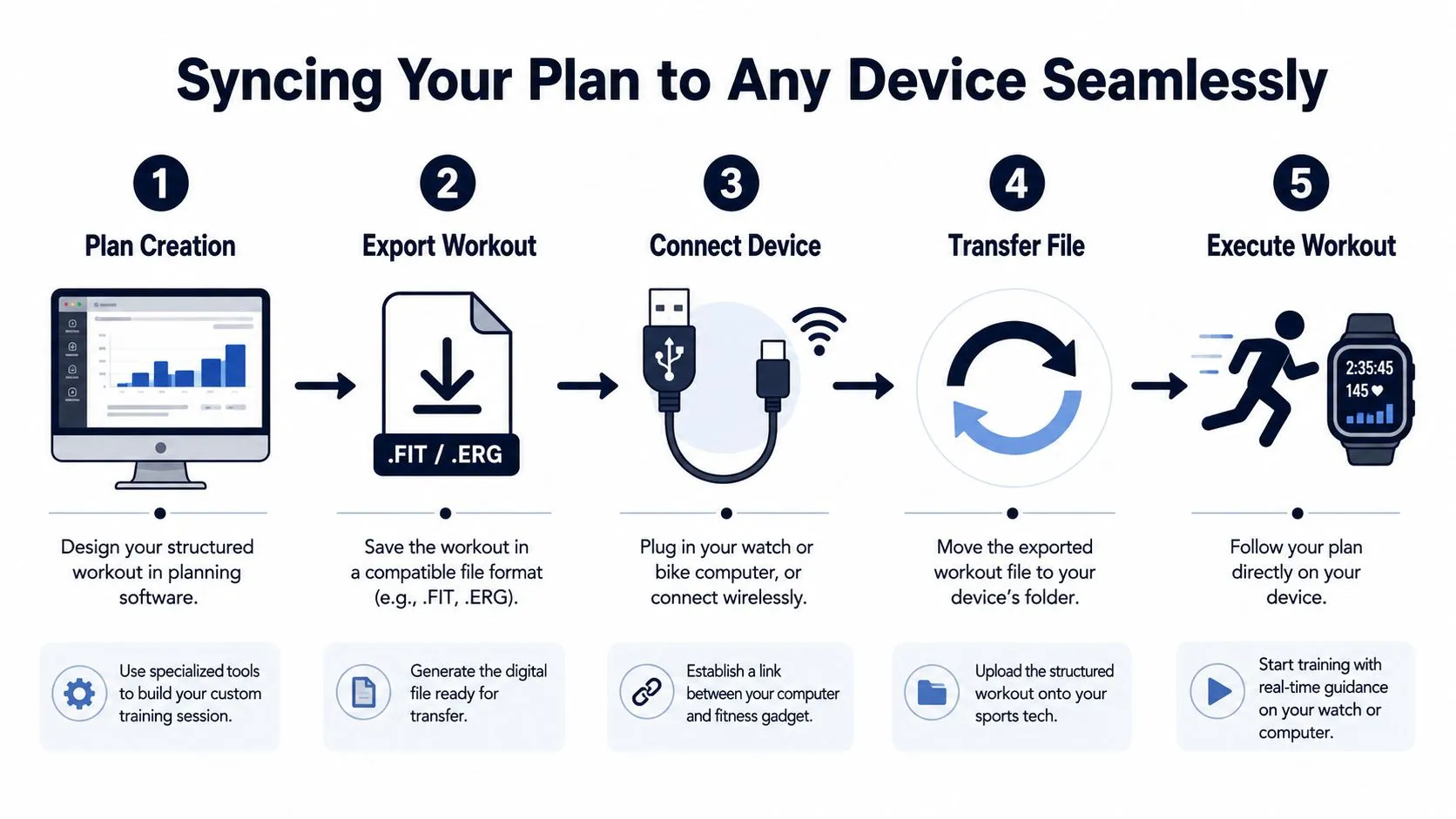
File exports still have a place. I still use them as a fallback. But they are a poor default if you want a calendar that stays accurate across an entire training cycle.
What a Direct Sync Process Changes
Direct sync fixes more than convenience. It protects the intent of the plan.
- The programmed session stays intact: Steps, recoveries, and targets carry through to the device.
- Execution gets easier: Prompts appear during the workout instead of living in a note the athlete has to memorize.
- Last-minute edits hold up: If a coach changes a session because of fatigue, travel, or weather, the athlete gets the current version.
- The calendar becomes operational: It stops being a nice overview and starts acting like the control layer for training.
That matters most when the session structure is detailed. Interval pyramids, over-under bike work, brick sessions, and progression-based strength workouts all break down fast when the athlete has to reconstruct them manually. If you want a model for writing sessions that are clear enough to convert into structured device-ready workouts, this guide to bike interval workout structure and planning is a useful reference.
The best device sync is the one the athlete does not have to think about.
That is also where modern AI workflows change the planning process. Instead of building each workout block by block in a clunky interface, coaches and self-coached athletes can write sessions in natural language, convert them into structured workouts, place them on the calendar, and send them to the device they already use. That closes the gap between classic planning logic and daily execution. Periodization still drives the plan. Automation handles the translation work.
Why Strength Planning Needs Better Calendar Support
Strength programming exposes the limits of many digital calendars faster than endurance work does.
A run can survive a vague label like “easy 45 min.” Strength rarely can. Exercise order, set and rep changes, tempo, rest, and progression rules all matter. If the calendar only shows “gym day,” the athlete ends up checking screenshots, notes apps, or old messages to piece the session together.
A June 2026 Bevel feature request for strength workout program calendar integration makes the gap obvious. Users are asking for a calendar or schedule view that shows the plan day by day across the full program. That request reflects a common planning failure, not an edge case.
A good workout planner calendar should handle both worlds well. It should support endurance sessions with precise targets and strength sessions with evolving structure. The practical win is simple. You can map the training block at a high level, write the workout in plain language, convert it into a structured session, and have the right version waiting on the right device without babysitting every transfer.
Advanced Strategies and Frequently Asked Questions
Advanced users don’t usually need more motivation. They need cleaner systems.
That’s true for coaches managing many athletes, triathletes trying to coordinate three disciplines, and self-coached athletes who want their calendar to stay useful even when the week goes sideways.
How Coaches Keep Calendars Manageable
The mistake I see most often is over-design. Coaches build beautiful calendars full of color coding, micro-notes, and edge-case detail that athletes never read.
The better approach is operational clarity:
- Keep the daily view simple: The athlete should know the session objective in seconds.
- Store complexity inside the workout: Put interval logic, repeats, and targets into the structured session, not a paragraph in the calendar cell.
- Review on a fixed rhythm: Weekly review works better than constant reactive edits.
- Use language the athlete naturally uses: This matters even more for multilingual groups and remote coaching.
If you coach cyclists, this breakdown of bike interval training workflow and workout structure is a useful model for keeping sessions precise without making the calendar messy.
A calendar should answer “What am I doing today?” immediately. It shouldn’t force the athlete to decode your system.
FAQ
How do I share my workout planner calendar with a training group?
Use a shared calendar view for timing and accountability, but keep the actual workout details individualized when needed. Group structure works best when the session theme is shared and the targets are personalized.
What’s the best way to integrate strength days?
Treat strength as training stress, not as a side note. Put heavy lower-body lifting where it won’t sabotage key run or bike sessions. If you’re doing hypertrophy or angle-based variations, write them clearly enough that the day has a purpose beyond “gym.”
What should I do if I miss a key workout?
Don’t automatically cram it into the next day. First ask what the session was supposed to accomplish. If moving it compromises recovery or disrupts the next key workout, skip it and continue the plan. One missed day rarely causes trouble. Panic rescheduling does.
How should triathletes handle brick workouts in the calendar?
Place them where transition stress makes sense, usually after a bike session that already has a race-specific purpose. Keep the calendar label simple and the structured workout detailed. “Bike threshold + short brick run” is enough for the calendar view.
How much detail belongs in the calendar itself?
Less than commonly assumed. The calendar should show the intent, timing, and placement of the session. The workout file or structured session should hold the fine detail.
A better planner does more than make your week look organized. It removes the manual work between a coach’s note and a finished session on your device. TextFit handles that part: type “warm up, 5 x 5 min at threshold with 3 min easy, cool down” in any language, review the structured workout, and it syncs to your Garmin or Wahoo and schedules on Apple Watch. Free to start, no sign-up needed.
Composed with Outrank tool