Cycling FTP Calculator: Master Your Training in 2026
You’ve probably had this moment. You ride consistently, finish hard group rides feeling strong, and still aren’t sure whether your training is pointed in the right direction. Your Garmin or Wahoo records everything, but the numbers don’t automatically tell you what to do next.
That’s where a cycling FTP calculator becomes useful. Not as a vanity metric, and not as a number to obsess over, but as a practical bridge between one hard test and a training plan you can follow on the road, indoors, and on your head unit. A good FTP number helps you stop guessing. It gives your endurance rides a ceiling, your threshold intervals a target, and your hard days a purpose.
The catch is that most riders stop too early. They do a test, get a number, maybe post it, then never turn that result into usable training zones or device-ready workouts. Its true value starts after the calculator gives you an answer.
If you just want your numbers right now, our free cycling W/kg & FTP zones calculator turns your FTP and body weight into your power-to-weight ratio and all six training zones in seconds. The rest of this guide covers how to get an FTP worth plugging in — and what to do with the zones once you have them.
Table of Contents
- What Is FTP and Why Does It Matter for Your Cycling
- The Three Main FTP Tests Explained
- Your Pre-Test Checklist and Execution Guide
- From Test Power to Training Zones The Calculation
- Putting Your FTP to Work Structured Training Made Easy
- Keeping Your FTP Relevant Retesting and Troubleshooting
What Is FTP and Why Does It Matter for Your Cycling
FTP stands for Functional Threshold Power. In practical terms, it’s the power number that helps anchor your training. If you know it with reasonable accuracy, you can stop turning every ride into the same medium-hard effort and start separating recovery, endurance, tempo, threshold, and high-intensity work the way good training demands.
Most motivated cyclists don’t plateau because they lack effort. They plateau because they ride hard too often, easy too rarely, and never quite know how hard “hard” should be. FTP fixes that. It turns vague intentions into targets your bike computer can display in real time.
Why W/kg matters more than raw watts
A rider pushing higher raw power isn’t automatically the better endurance athlete. Relative power matters more once the road tilts up or the pace stays high long enough. Benchmark data from 47 km mass-start mountain bike races found a strong negative correlation between FTP relative to body mass and race performance (r = −0.74, p < 0.01), which supports using W/kg as the more useful predictor over absolute FTP alone, as shown in this bike training zones calculator analysis.
That’s why a cycling FTP calculator shouldn’t just spit out one watt number and stop there. It should also help you think in watts per kilo, because that’s often closer to what shows up in climbing, repeatability, and race outcomes.
FTP is most useful when it changes how you train tomorrow morning, not when it sits untouched in an app profile.
What FTP changes in daily riding
Once you have a believable FTP, several things become simpler:
- Endurance rides get disciplined: You can keep easy days easy enough to recover.
- Tempo and threshold sessions get precise: You know whether you’re building stamina or just riding hard.
- Device prompts become meaningful: A Garmin or Wahoo target only helps if the target itself is sound.
- Progress gets easier to spot: If the same workout feels easier, or your zones move up after a retest, you can see the change clearly.
FTP isn’t perfect, and it doesn’t describe every part of fitness. But for day-to-day cycling training, it’s still one of the most practical anchors you can use.
The Three Main FTP Tests Explained
You finish a hard test, get a number, and feel relieved for about five minutes. Then the true question shows up. Was that result good enough to build next week’s workouts and trust the targets on your Garmin or Wahoo?
That is why test choice matters. The best protocol is the one you can execute cleanly, repeat later under similar conditions, and use with confidence in your training platform and head unit.
How the classic test works
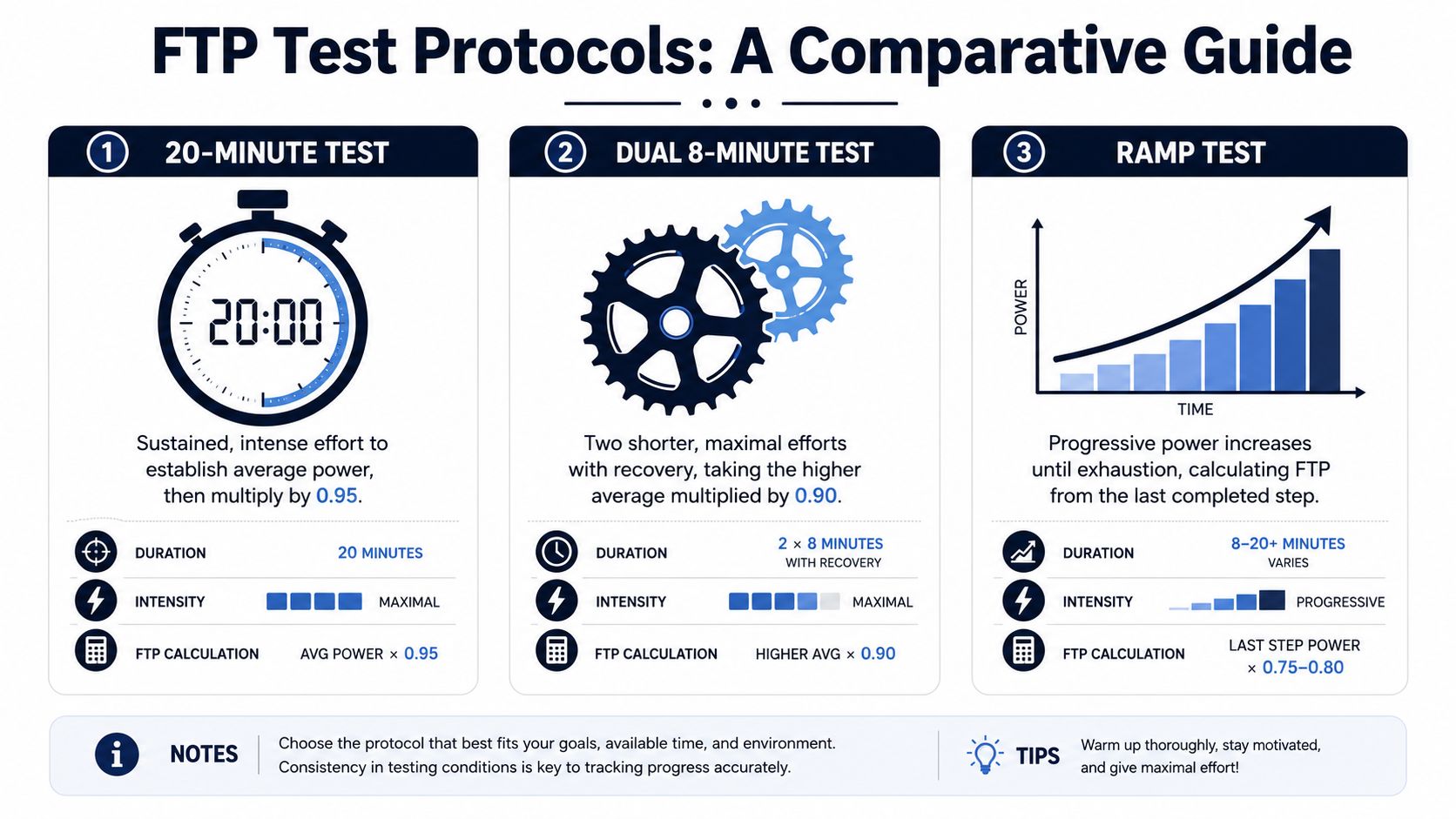
The standard field option is the 20-minute maximal test with a 0.95 correction. Ride 20 minutes as hard as you can sustain evenly, take the average power, and multiply by 0.95. A 250-watt average gives an estimated FTP of 237.5 watts.
Coaches still use this method because it usually gives a useful training anchor if the pacing is honest. It also transfers well into the tools riders already use. Enter the result into TrainingPeaks, Zwift, Wahoo SYSTM, Garmin Connect, or your head unit profile, and your zones update in a way that usually makes sense on the road.
The catch is pacing. Riders who go out too hard often fade and get a low estimate. Riders who hold back too much can also miss the mark. If you want a closer look at how the common protocols differ in practice, this guide to cycling FTP test formats gives a solid side-by-side overview.
How the shorter and ramp options compare
The 2 x 8-minute test lowers the mental load. You do two hard 8-minute efforts with recovery between them, average the two intervals, and apply a 0.90 multiplier. For riders who struggle to judge a full 20-minute effort, that format is often easier to execute well.
There is a trade-off. Shorter tests can favor riders with strong anaerobic punch and can come out slightly low or high depending on how the efforts are paced. That does not make the result useless. It means you should judge it by how well your first threshold workouts fit afterward, not by formula alone.
The ramp test is the easiest to administer indoors. Power rises step by step until you cannot hold the target, and software estimates FTP from your best completed minute or final minute power, depending on the platform. It is popular for a reason. It removes much of the pacing skill, fits neatly into smart trainer systems, and gives you a number you can push straight into a Garmin or Wahoo workflow.
Ramp tests also have a known limitation. Riders with a big anaerobic engine can test high. Diesel riders sometimes test low. I use ramp results as a starting point, then confirm them against real workouts within the next 7 to 10 days.
Here is the practical comparison:
| Protocol | Total Test Duration | Calculation | Best For | Primary Drawback |
|---|---|---|---|---|
| 20-minute test | Longer sustained session | 20-minute average power × 0.95 | Experienced riders who can pace well | Easy to mis-pace |
| 2 x 8-minute test | Shorter maximal blocks with recovery | Average of the efforts × 0.90 | Riders who fade mentally in long efforts | Can drift from true threshold for some athletes |
| Ramp test | Progressive steps to failure | Platform-based estimate from final ramp power | Beginners, indoor riders, pacing-sensitive athletes | Can overestimate or underestimate FTP based on rider profile |
Practical rule: Choose the test that matches how you ride and train. If you do most work indoors on a smart trainer, a ramp test is often the cleanest way to get a usable number into your devices fast. If you race long efforts and pace well, the 20-minute test usually gives a more durable benchmark. If you dread long solo suffering but still want a field test, the 2 x 8-minute option is a sensible middle ground.
The 60-minute time trial remains the closest direct measure of FTP. Very few riders perform it well outside a controlled setting, and even fewer want to repeat it regularly. For training purposes, a repeatable test you can trust and use beats a perfect protocol that you avoid.
Your Pre-Test Checklist and Execution Guide
A bad test doesn’t just give you a bad day. It can distort weeks of training. If your FTP is set too low, threshold work becomes tempo. If it’s too high, even solid workouts start to feel like repeated failures.
What to control before test day
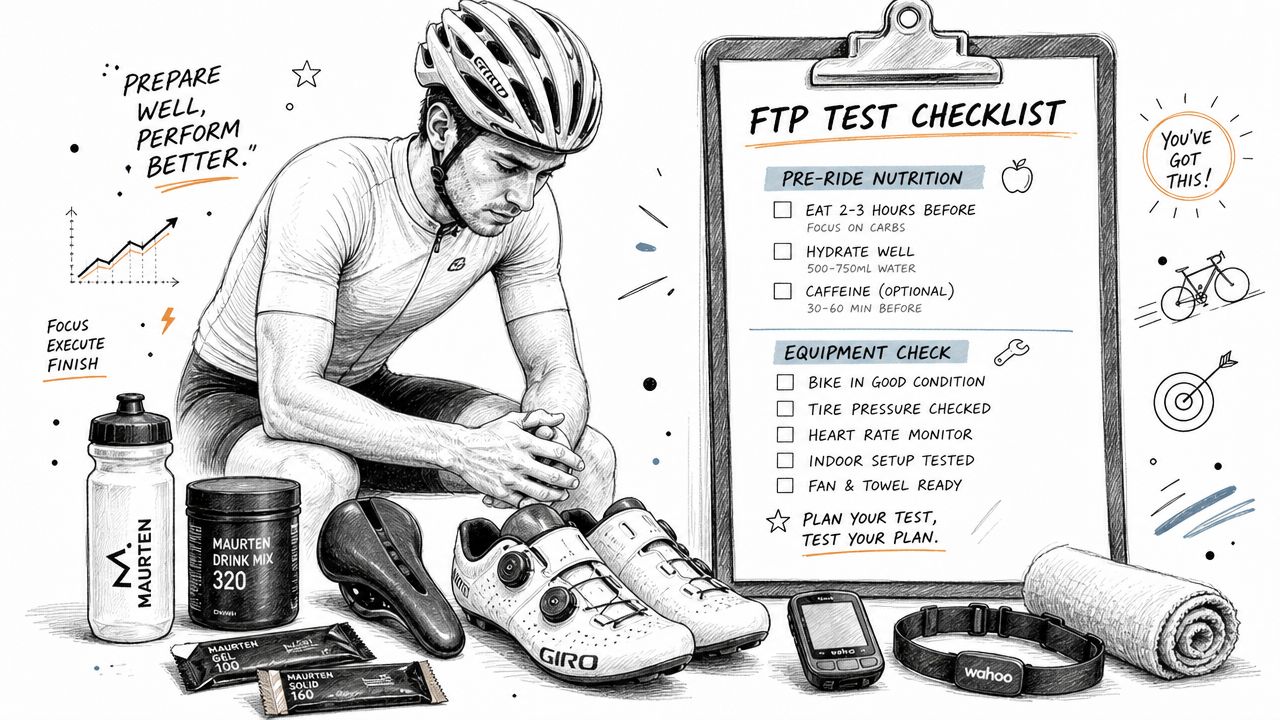
You want the result to reflect fitness, not noise. Keep the setup boring and repeatable.
- Rest properly: Don’t schedule your test the day after a race, smash ride, or heavy gym session.
- Eat like you mean it: Go into the test fueled, not trying to prove you can suffer on low glycogen.
- Hydrate early: Fixing hydration during the warm-up is too late.
- Use the same setup you train with: Same trainer or bike, same fan setup, same power source if possible.
- Check calibration: An untrustworthy meter poisons the whole process.
- Choose the right environment: Indoors gives control. Outdoors can work well if you have a long uninterrupted stretch.
The strongest tests come from repeatable conditions. Coaches care less about whether you test inside or outside than whether you can repeat the same method later and compare like with like.
How to pace the effort
The biggest failure in the 20-minute test isn’t always going out too hard. It’s often riding too cautiously and never reaching the effort you could’ve held. Research cited in the earlier WinSportsUS source found that 37% of cyclists who missed their target FTP within ±5 watts of true CP left more than 10% effort unused in the first 10 minutes, producing a mean underestimation of 14 watts.
That matches what happens in real training. Riders fear exploding, so they protect themselves too much early and finish with a late surge that can’t undo the damage.
Start a touch conservative for the first few minutes, then settle, then build. If you feel perfect halfway through, you probably started too easy.
A simple pacing script for a 20-minute test works well:
- First few minutes: Keep pressure under control. Breathing rises, but it shouldn’t feel frantic.
- Middle block: Lock into the hardest pace you believe you can hold to the end.
- Final stretch: Lift only if you’re still stable, not because the clock says you should panic.
Warm-up details that actually matter
Don’t roll straight from easy spinning into the test. A proper lead-in helps you reach test power faster and with less shock.
A useful structure looks like this:
- Progressive warm-up: Build gradually from easy to moderate.
- A few short hard efforts: Open the legs and wake up the aerobic system.
- Easy reset period: Let the breathing come down before the main effort.
- Start the test on purpose: Don’t drift into it casually.
Common mistake: Riders spend all their discipline on the warm-up, then begin the actual test mentally flat. Save your focus for the effort that counts.
If the result feels clearly wrong because of fatigue, equipment issues, or pacing, don’t force your whole training block around it. Throw out the bad test, recover, and repeat under better conditions.
From Test Power to Training Zones The Calculation
You finish the test, save the file, and get a number that feels important. The useful part starts after that. FTP only helps if it turns into targets you can ride to on an ordinary Tuesday, with your head unit beeping at the right time and the right power.
The math behind the number
For a classic 20-minute test, the calculation is simple. Take your average power for the full 20 minutes and multiply it by 0.95. If you averaged 280 watts, your estimated FTP is 266 watts.
That estimate works well for many riders, but it is still an estimate. A punchy rider may test well over 20 minutes and get an FTP that ends up too high for steady threshold intervals. A diesel rider may see the opposite and find that long sweet spot or threshold work feels easier than the number suggests. Test type matters too. Ramp tests and 8-minute tests use different assumptions, so the result can shift before you even start training.
That is why coaches do not treat FTP as a sacred value. They treat it as a working number. Once you have that working number, drop it into our FTP zones calculator and you get the exact watt range for every zone, plus your W/kg.
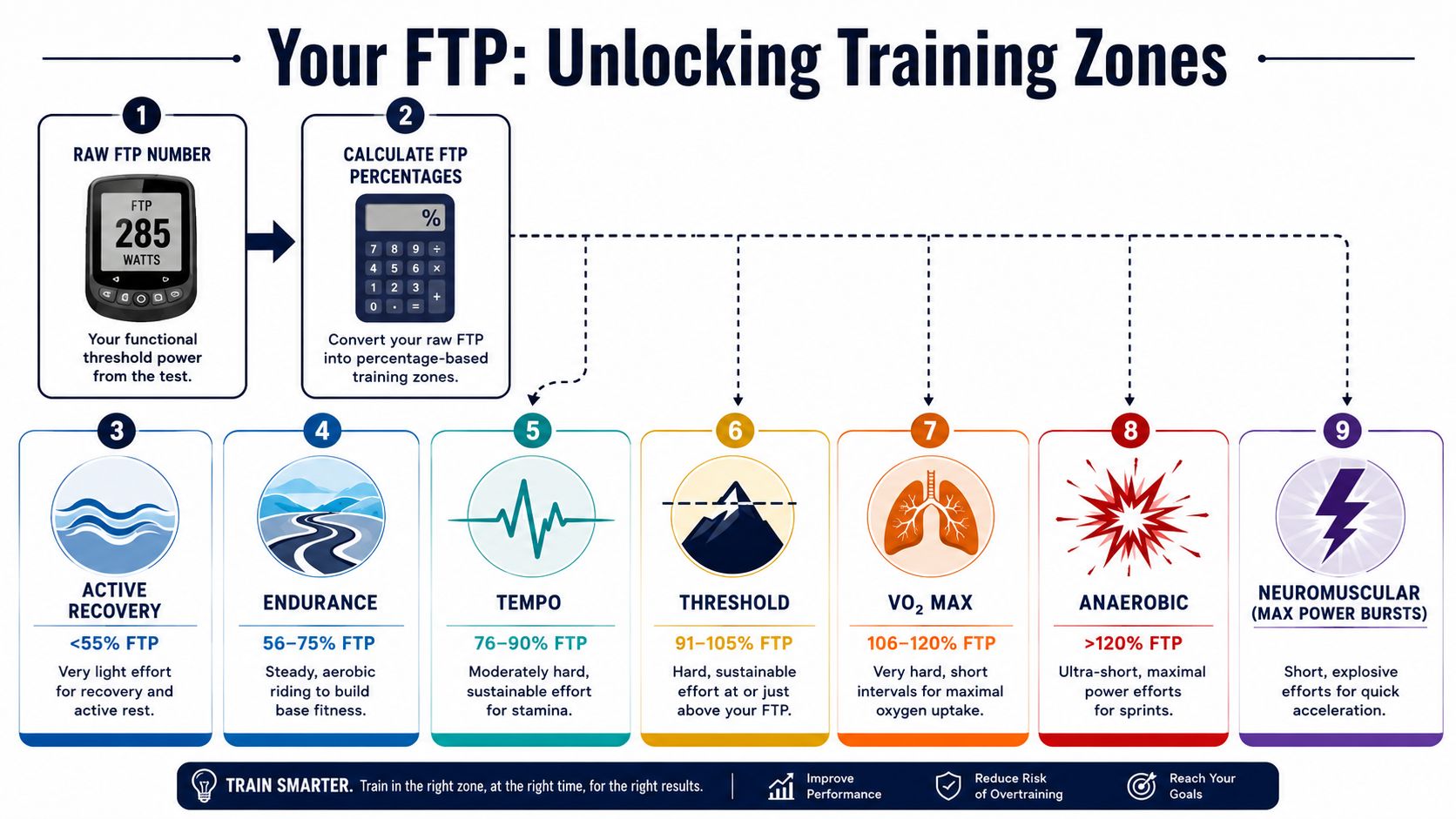
If you want a clear breakdown of how percentages map to each zone, this FTP zone calculator for cycling training zones gives the full range.
What the zones actually do
Once FTP is set, every zone gives you a job for the day. A practical seven-zone model usually looks like this:
- Active Recovery: Very light spinning for recovery rides and easy circulation.
- Endurance: Steady aerobic work that builds repeatable volume.
- Tempo: Moderately hard riding that builds muscular endurance.
- Threshold: Sustained work near FTP for improving steady race pace.
- VO2 Max: Hard efforts above threshold that stress aerobic capacity.
- Anaerobic: Short intervals for repeat surges, attacks, and punch.
- Neuromuscular: Maximal sprints and accelerations.
The mistake I see most often is not bad math. It is bad use. Riders get a fresh FTP, see stronger numbers on the screen, and start pushing endurance rides upward until easy days stop being easy. Then the hard days flatten out too.
A good FTP result sets boundaries as much as targets.
In daily training, the zones should make decisions easier. Endurance rides stay controlled. Recovery rides stay genuinely light. Interval days hit the intended range instead of drifting by feel and turning into a mixed session that trains everything a little and nothing especially well.
If your threshold intervals always crack early, or your endurance rides feel laughably easy, do not force the plan to fit the number. Adjust. The best FTP is the one that matches the work you can repeat in training and then load into your Garmin or Wahoo with confidence.
Putting Your FTP to Work Structured Training Made Easy
Getting your FTP is one job. Building training from it is another. Many cyclists often lose momentum here. They know their number, they understand the zones, and then they still end up free-riding most workouts because turning a written session into a structured file feels tedious.

What an FTP-based workout looks like
A normal session built from FTP doesn’t need to be complicated. A coach might write something like this:
- Warm up thoroughly
- Ride 2 x 20 minutes at upper tempo to low threshold
- Take easy spinning between efforts
- Cool down
Or it might be a sharper day:
- Easy warm-up with a few short openers
- Threshold repeats
- Short recovery valleys
- End with easy spinning home
That’s enough for a human to understand. It’s often not enough for a head unit to execute cleanly unless you convert it into structured steps with exact durations and targets.
Where most athletes lose time
Garmin and Wahoo devices are excellent once a workout is loaded correctly. The friction comes earlier. Dragging blocks around in a workout builder, setting power targets manually, fixing repeats, checking recovery durations, and making sure the session matches the coach note or your own plan can become a chore.
That’s one reason structured training breaks down in practice. Not because athletes don’t want to follow the workout, but because building the workout is one more administrative task on a busy day.
A better workflow is to keep the writing natural, then convert it into a session your device can understand. This becomes especially useful if you train across platforms or want clean interval guidance instead of remembering the next step mid-ride.
For ideas on how coaches and self-coached athletes organize sessions over time, this structured workout plan guide shows the broader planning side.
Here’s what that looks like in action:
The practical payoff is consistency. Once workouts are structured and pushed to the device, the bike computer does the remembering. You just ride the target. That’s the bridge from a cycling FTP calculator to training you can repeat week after week.
The useful athlete isn’t the one with the fanciest spreadsheet. It’s the one who can turn Tuesday’s plan into Tuesday’s completed workout.
Keeping Your FTP Relevant Retesting and Troubleshooting
FTP is a snapshot, not a permanent identity. If you keep using an old number while fitness changes, your zones drift away from reality. That’s why a solid training process includes regular updates, not one heroic test every once in a while.
When to retest
A practical standard is to retest every 6 to 8 weeks during a training block, because FTP changes with training load, recovery, and adaptation. Without recalibration, power zones become less reliable over time, and training platforms have observed a growing fitness drift when athletes keep static FTP values too long, as noted in this FTP calculator and retesting reference.
That schedule is frequent enough to keep workouts relevant without turning testing into a hobby.
What to do with a bad result
Not every low number means you lost fitness. Sometimes you were carrying fatigue. Sometimes the pacing was off. Sometimes the trainer setup felt wrong from the start.
Use common sense:
- If workouts suddenly feel too easy: Your FTP may have moved up, or your current block is doing its job.
- If threshold sessions become impossible: You may be carrying fatigue, or the last test overshot reality.
- If one test looks strange: Compare it with recent training files and how your key sessions have felt.
- If the day was clearly compromised: Recover, keep training sensibly, and repeat the test under better conditions.
A useful athlete doesn’t cling to one number. They keep the number current enough to guide the next block well.
If you already know your FTP and can describe a workout in plain language, TextFit helps turn that note into a structured session you can review and send to compatible devices like Garmin and Wahoo. It’s a practical way to move from “2 x 20 minutes near threshold” in your notes to a workout that’s ready on your head unit without spending extra time in a manual builder.