TextFit with intervals.icu
An AI coach that plans your intervals.icu calendar
Connect intervals.icu once. TextFit’s coach keeps the next 7 days of your plan on your intervals.icu calendar as structured workouts in your own paces, watts and heart rates, and reads your activities, HRV and sleep back to adjust it.


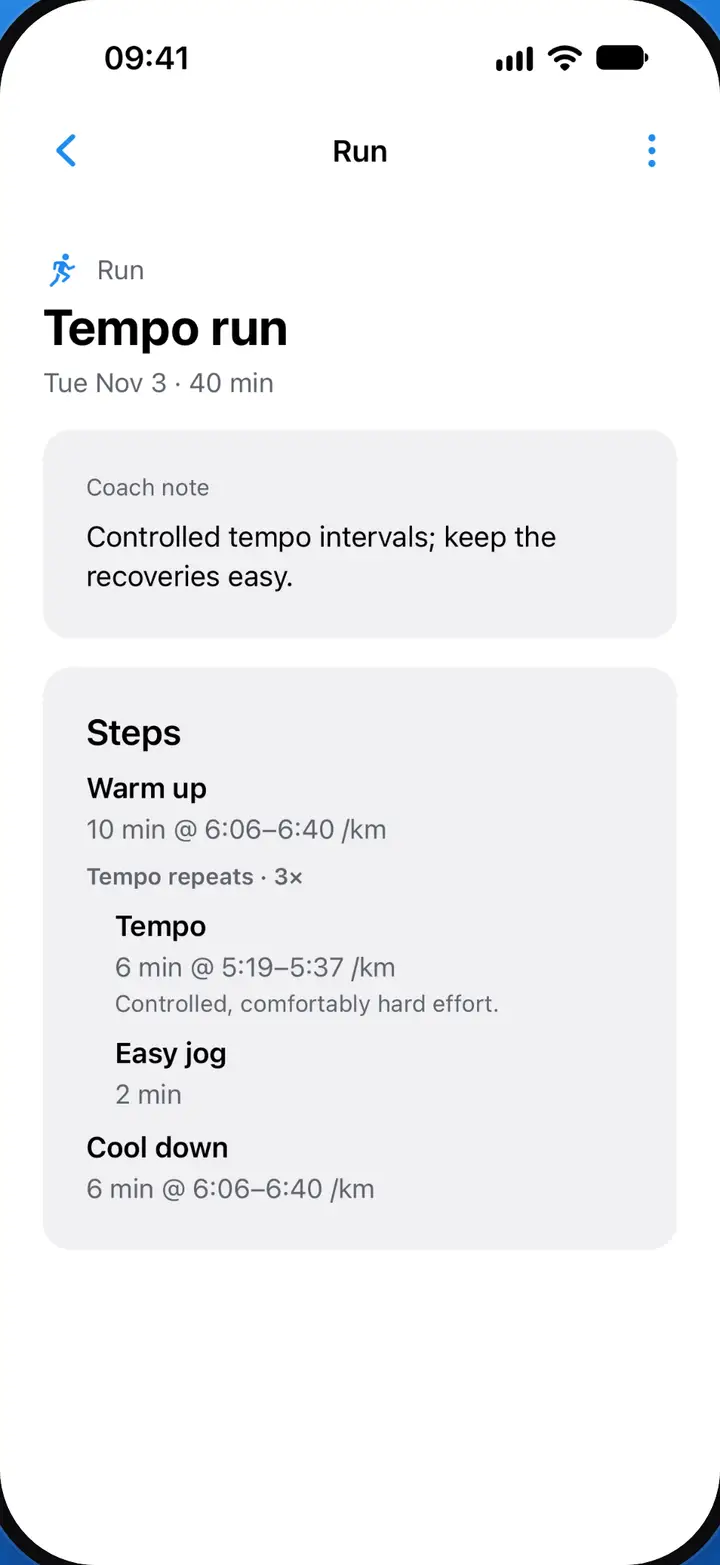
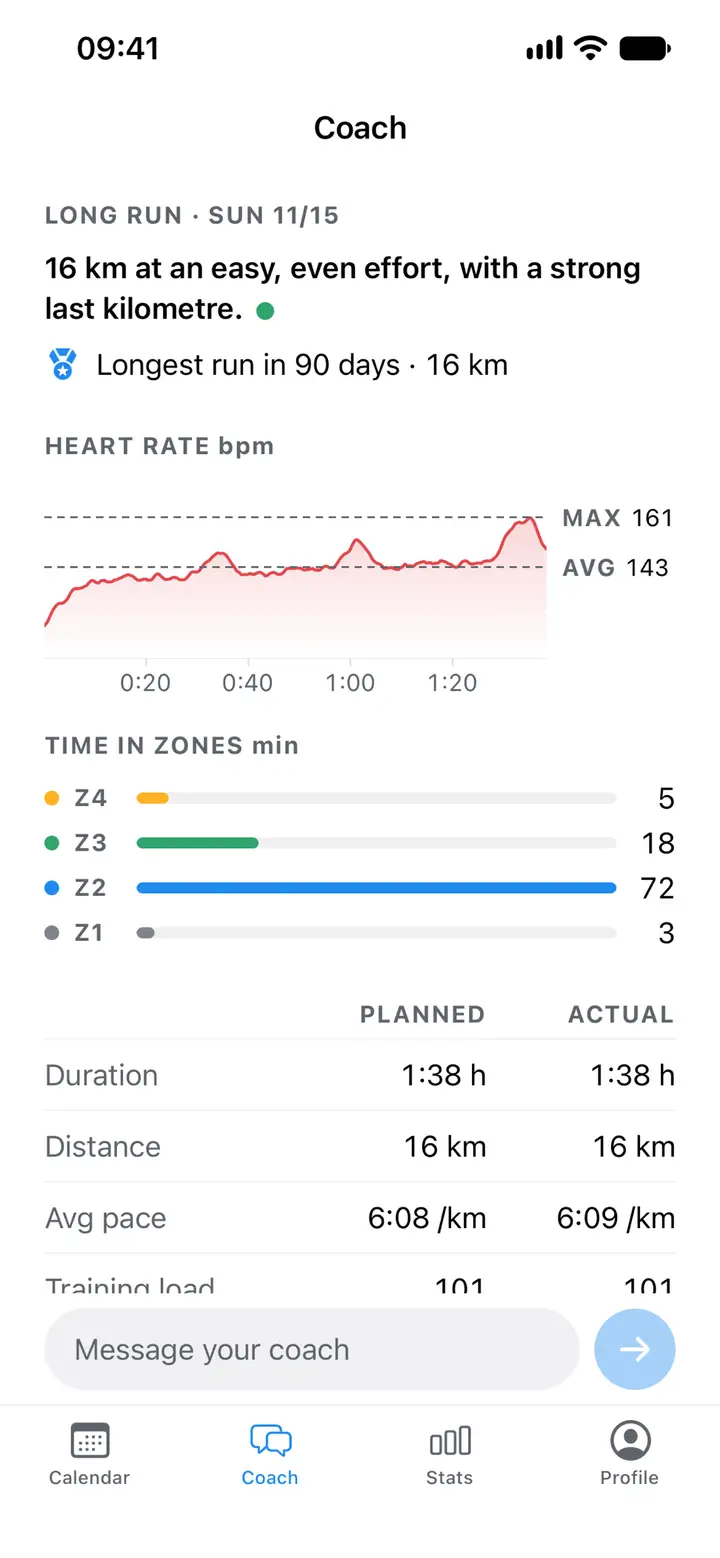
In short: TextFit is an AI coach that puts its plan on your intervals.icu calendar. It plans run, bike, swim and strength sessions around your week. Connect intervals.icu in TextFit on your iPhone and the next 7 days go to your calendar there as structured workouts, which intervals.icu passes on to the devices you’ve linked to it. Completed activities and recovery data come back, so the coach can assess them. TextFit is free to download and use; the coach and the workouts on your calendar come with TextFit Pro (14 days free).
How TextFit works with intervals.icu
TextFit does the coaching. It builds your week from your goal, sessions per week, the time you have and your current fitness, on fixed rules: about 80% easy, at most two hard days a week and never back to back, a recovery week after three build weeks. intervals.icu holds the calendar. TextFit writes the workouts there, intervals.icu passes them on to your devices, and when you finish a session TextFit reads the activity back. How the coach builds and adapts a week explains the rules in full.
What goes to your intervals.icu calendar
- The next 7 days, automatically. The planned workouts in that window are added to your intervals.icu calendar as structured workouts, steps included.
- Targets in your numbers. Run paces, bike watts and heart rates come from your own thresholds, for example “Tempo ride · 38 min · 2×6 min @ 200–213 W”.
- Updates when the plan changes. Move a session in the coach chat, change a threshold, or let a new day enter the 7-day window, and only the workouts that changed are sent again. A workout removed from your plan is removed from the calendar too.
- Anything further out, by hand. Open a later workout and choose Push to intervals.icu to put it on the calendar early.
What comes back from intervals.icu
- Completed activities. A finished run, ride or swim is matched to its planned workout and marked as completed. When you connect, TextFit also reads your last 28 days, so the coach starts from the training you have actually done.
- Recovery data. HRV, resting heart rate and sleep from your intervals.icu wellness data, which the coach compares with your own normal range.
With that, the coach can give you three kinds of assessment:
- Workout: planned versus actual, and time in target, such as “4/5 · 82%” of key intervals inside the band.
- Form: Fitness, Fatigue and Form from your training load, computed in code.
- Recovery: 🟢, 🟡 or 🔴, with one-tap Ease today on a 🟡 or 🔴 day.
How to connect intervals.icu
- Install TextFit on your iPhone and answer the onboarding questions. The coach builds your first two weeks from your answers.
- In the app, go to Profile → Settings → Devices and tap Connect on the intervals.icu row.
- Sign in on intervals.icu’s own page and allow TextFit access to your calendar, activities and wellness data.
- Your next 7 days appear on your intervals.icu calendar, and your recent activities and recovery data come in.
Good to know
- intervals.icu with Garmin, Apple Watch or Wahoo. Every connected device gets the automatic pushes. When the same activity arrives from a direct connection and from intervals.icu, TextFit keeps the direct copy, and recovery data comes from intervals.icu only when no other source has it.
- Deleted in intervals.icu stays deleted. If you remove a pushed workout from your intervals.icu calendar, TextFit won’t put it back on its own. Push it again from the app if you want it back.
- Reconnecting. If you remove TextFit’s access in intervals.icu, the calendar in TextFit shows “intervals.icu disconnected · Reconnect” and nothing is pushed until you connect again.
- Disconnecting. TextFit’s upcoming workouts are removed from your intervals.icu calendar; your completed workouts and recovery data stay in TextFit.
Questions about intervals.icu
Is there an AI coach that works with intervals.icu?
Yes. TextFit is an AI coach app that puts its plan on your intervals.icu calendar: the next 7 days as structured workouts with your own paces, watts and heart rates, updated whenever the plan changes. Completed activities and your HRV, resting heart rate and sleep come back from intervals.icu, so the coach can assess each workout and adjust the coming days. You connect it in TextFit on your iPhone.
What does TextFit put on my intervals.icu calendar?
Your planned workouts for the next 7 days, each as a structured workout with its steps and targets, plus any later workout you push by hand. When the coach moves, changes or removes a session, the calendar entry follows.
Do my Garmin and Zwift activities count?
Yes, when they reach your intervals.icu account: TextFit reads completed activities from intervals.icu and matches them to the planned workouts. If the same activity also arrives from a device you connected to TextFit directly, such as Garmin, TextFit keeps that direct copy.
I use Garmin and intervals.icu. Should I connect both to TextFit?
You can. Every connected device gets the workouts, so if intervals.icu also passes workouts on to the same Garmin, a session can show up twice on your watch; then keep one of the two connections. Completed activities are never counted twice: the Garmin copy wins.
I connected intervals.icu in the earlier TextFit app. Do I have to connect again?
No. A connection made in the earlier version of TextFit shows as connected in the current app, and your workouts start going to your intervals.icu calendar once you have finished onboarding.
Can I connect intervals.icu on Android?
Not yet: today the intervals.icu connection is in TextFit on iPhone. On Android, TextFit sends your workouts to Garmin and Wahoo directly.
What the coach plans for your sport: the AI running coach and the AI triathlon coach. Price, devices and data questions are answered in the FAQ.
intervals.icu is named here only to describe the connection. TextFit is an independent app and is not made or endorsed by intervals.icu.
Put your plan on your intervals.icu calendar
Install TextFit on your iPhone and answer the onboarding questions. The coach builds your first two weeks; connect intervals.icu in Devices and they go to your calendar.
Free to download and use. TextFit Pro adds the AI coach: 14 days free, then $14.99/month or $99.99/year. Cancel anytime in your App Store or Google Play settings.